Posted on

High-Density Servers: Unlock Hidden Rack Capacity and Cut Costs

Data center technician working on high-density servers on cable management - featured image

Data centers are in a constant game of Tetris—trying to stack more compute power, storage, and networking gear into the same (or smaller) footprint. That’s where high-density servers come in. They let you consolidate resources, save space, cut energy use, and keep up with fast-changing tech demands.

So what are high-density servers exactly? Why do they matter right now? And how do you make them work without turning your racks into a hot, tangled mess? Let’s break it down.


Key Takeaways

By the end of this article, you’ll know:

  • Why high-density servers are crucial for modern data centers.
  • Why effective cable management is vital for success.
  • How high-density server strategies provide long-term benefits.
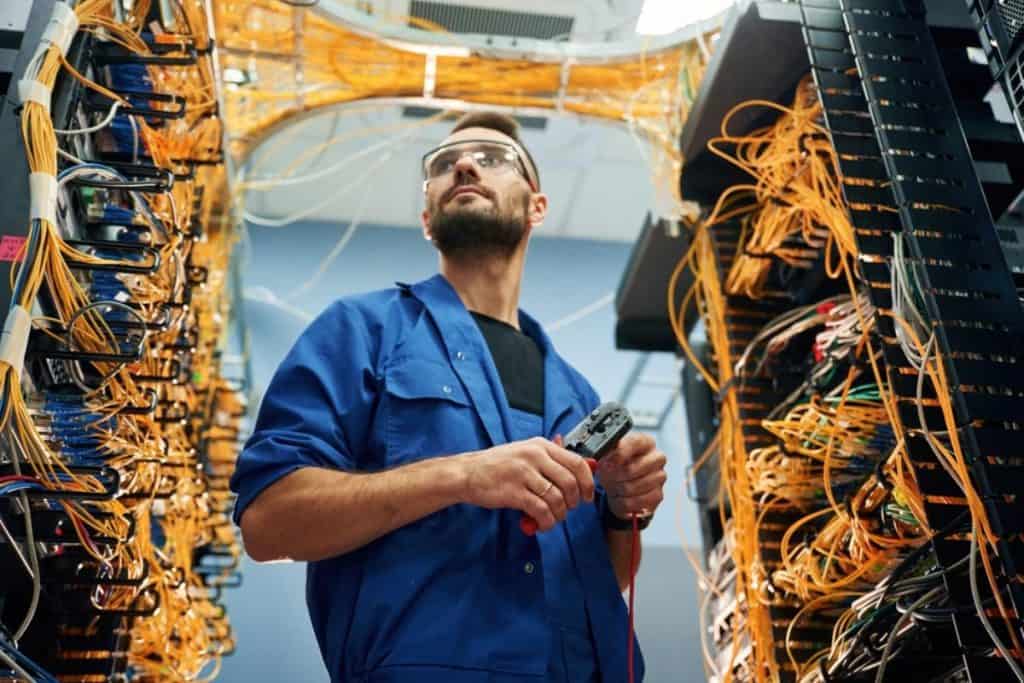
Data center technician working on high-density servers on cable management

Defining High-Density Servers: What Does “High-Density” Really Mean?

At its core, a high-density server strategy involves packing more computing power or storage capacity into each rack unit. This typically means using hardware designs that maximize performance per square inch, such as multi-blade chassis or specialized 4U systems housing multiple compute nodes. 

The goal is straightforward: handle bigger workloads in a smaller space.

Recent technological advances have accelerated the shift toward higher-density computing. High-Performance Computing (HPC) clusters, for instance, cram dozens of powerful nodes into tightly arranged racks to handle massive simulations or data analytics. Likewise, edge computing deployments require compact solutions in remote or space-constrained facilities. Both scenarios drive the need for servers that deliver robust performance without demanding a warehouse-sized data center.

This isn’t just about saving space—it’s about working smarter. Bottom line: high-density servers are built for modern demands.

Why Now?

The surge in data creation—from AI workloads, streaming media, Internet of Things (IoT) devices, and beyond—continues to push infrastructure to its limits. Not only that, data center real estate is pricey. 

At the time of writing, two data center campuses totaling 38 buildings were proposed in Yorkville, Illinois—many identical proposals popping up in other states. With the current pace of data center projects worldwide, real estate is becoming increasingly valuable, raising its price exponentially.

Every rack unit saved can translate into substantial cost savings, whether you’re leasing colocation space or managing your own facility. Additionally, new server designs and virtualization technologies make it easier than ever to run multiple tasks on fewer physical machines, making high-density strategies even more appealing.

The Benefits of Going Dense

Space Optimization

High-density servers help you do more with the same (or even smaller) footprint. By consolidating multiple compute resources into fewer racks, you can either accommodate additional workloads in your current space or avoid moving into a larger facility. This optimization is particularly vital for colocation data centers, where every extra square foot comes with a price tag.

Cost Reduction

Driving up server density can lead to lower total cost of ownership (TCO). Fewer racks mean reduced cooling requirements, lowered energy consumption, and fewer networking components. Some data centers also discover they can postpone major expansions, freeing up capital for other pressing investments. As long as your infrastructure supports it, being able to pack more capacity into existing real estate is a direct line to cost savings.

Future-Readiness

While growth is the norm in most tech environments, the pace can be unpredictable. High-density servers provide a flexible, scalable platform to handle new demands such as AI, cryptocurrency mining, or HPC workloads. 

Adopting a higher-density approach positions you to integrate new technologies without constantly redesigning your entire layout. This future-readiness ensures your data center can adapt to tomorrow’s needs just as well as it handles today’s.

Data center engineer auditing high density server for further server consolidation

The Challenges: Cooling, Cabling, and Complexity

Heat Density

High-density servers generate more heat per rack than their lower-density counterparts. If your data center’s cooling isn’t designed for that increased thermal load, you risk creating hotspots that reduce hardware lifespan and drive up energy bills. Proper airflow management—whether through hot/cold aisle containment or advanced cooling solutions—becomes an absolute must in these environments.

Cable Overload

Cramming more machines into the same area inherently multiplies the number of cables. Network cords, power cables, and patch panels can quickly evolve into a tangled mess if not handled methodically. Beyond just aesthetics, cluttered cables limit airflow, complicate maintenance, and heighten the risk of accidental disconnections.

Maintenance Access

A denser environment can also mean tighter spacing around hardware. Routine tasks like replacing a server component or re-labeling cables become far more time-consuming in cramped racks. Technicians need clear pathways and structured cable layouts to ensure they can work without disturbing adjacent equipment—no small feat when racks are at peak capacity.

Making It Work with Zero U Cable Management

An Efficient Approach to High-Density Challenges

When your data center moves toward high-density racks, cable organization and management plays a pivotal role in ensuring success. Zero U Cable Management allows you to mount cables in the same rack space used by the active devices—rather than above or underneath them—thereby freeing up valuable rack units and improving overall airflow. By relocating the cables, you open up existing rack space for additional active devices at minimal expense. You can gain back as much as 30% of your rack capacity.

Horizontal Zero U RackOrganizer for High-Density Servers

This reclaimed space isn’t just about fitting more servers or blades; it’s also about optimizing cooling. With cables neatly routed and secured, air circulates more freely to critical components, reducing hot spots and letting your cooling infrastructure work more efficiently. Technicians, too, will find it easier to access individual servers without the usual hassle of untangling cords or tracing lines. Maintenance becomes quicker, less error-prone, and far less disruptive to your operations.

  • Rack Space Reclaimed: Up to 30% freed per rack, reducing or delaying the need to buy new cabinets.
  • Improved Cooling: Better airflow can trim down energy bills related to cooling and extend hardware life.
  • Simpler Maintenance: Cutting clutter saves technician hours and minimizes risk of accidental disconnects.
Comparison between Zero U Cable Manager (High-Density Optimization) and 1RU Cable Manager (Traditional)

Real-World Example: The Importance of Airflow and Efficiency

The Thomas Jefferson National Accelerator Facility’s data center, with its hot aisle containment, is a prime example. A Key element to the hot aisle containment is optimizing the airflow through proper server organization and cable management, which the facility did. The facility reported an annual energy savings of over $37,000, and reduced mechanical energy consumption by 50 percent! To highlight, optimizing airflow is impossible with bad cable management. Optimized airflow is only achieved with great cable management.

Consolidate, Grow, and Thrive

Assess Your Current Setup

Every data center is unique. Performing a thorough audit of how your racks are currently laid out is an essential first step. Look for unused vertical or horizontal spaces where cables could be rerouted. Check the capacity of your power and cooling systems to ensure they can handle increased density.

Start with Cable Management

Before you reconfigure servers or invest in new hardware, address cable clutter. It’s often the most cost-effective way to free up immediate rack space and boost airflow. Introducing structured cable management solutions, like Zero U Cable Managers, is a relatively low-risk move that can yield quick, measurable gains.

Plan for Future Growth

High-density strategies thrive when combined with a thoughtful roadmap. As new hardware generations and technologies arise, your infrastructure should be able to adapt. By maintaining a well-organized environment now, you can scale more easily—fitting new servers, blades, or even specialized crypto mining equipment without needing continuous expansions.

Take the Next Step with AnD Cable Products

High-density servers might be a game-changer for your data center, but execution is key. If you’re ready to streamline your operations, lower costs, and accommodate bigger workloads, consider adding dedicated cable management solutions to your arsenal. Take the first step by conducting a basic rack and cable audit, or reach out to professionals who can tailor a high-density plan for your exact needs. The sooner you optimize your layout, the sooner you’ll start reaping the rewards of greater rack capacity and lower overall operating costs.

With the right strategy, high-density servers can offer remarkable efficiency gains. By acknowledging the critical role that cooling, cabling, and maintenance access play in such dense environments, you pave the way for a streamlined, future-ready data center.

FAQs

What are high-density servers?

High-density servers are a data center strategy that involves packing more computing power or storage capacity into each rack unit. This is achieved through hardware designs that maximize performance per square inch, such as multi-blade chassis or specialized 4U systems that house multiple compute nodes. The primary goal is to handle larger workloads in a smaller physical space.

Why are high-density servers important now?

The demand for high-density servers is surging due to the exponential growth of data from sources like AI, streaming media, and IoT devices. Additionally, data center real estate is becoming increasingly valuable and expensive. By using high-density servers, organizations can save valuable rack space, reduce costs, and more easily handle the demands of modern technologies like High-Performance Computing (HPC) and edge computing.

What are the main benefits of using high-density servers?

–Space Optimization: They allow you to consolidate more resources into fewer racks, potentially accommodating additional workloads or avoiding the need for a larger facility.

–Cost Reduction: Fewer racks lead to reduced cooling and energy consumption, and fewer networking components, which lowers the total cost of ownership (TCO).

-Future-Readiness: They provide a flexible and scalable platform to handle new technologies and unpredictable growth, allowing for easier integration of new hardware without constant redesigns.

What are the challenges associated with high-density servers?

–Heat Density: High-density servers generate more heat, requiring advanced cooling solutions and proper airflow management to prevent hotspots.

–Cable Overload: Packing more machines into a small space can lead to a tangled mess of network and power cables, which limits airflow and complicates maintenance.

-Maintenance Access: The tighter spacing makes routine tasks like component replacement or cable labeling more difficult and time-consuming.

How does Zero U Cable Management help with these challenges?

Zero U Cable Management is a solution that helps mitigate the challenges of high-density server environments. It allows cables to be mounted in the same rack space as active devices, but without consuming valuable rack units. This frees up to 30% of rack capacity, improves airflow by neatly routing cables, reduces hotspots, and makes maintenance easier and less disruptive for technicians.

About the Author

Louis Chompff - Founder, AnD Cable Products, Rack and Cable ManagementLouis Chompff – Founder & Managing Director, AnD Cable Products
Louis established AnD Cable Products – Intelligently Designed Cable Management in 1989. Prior to this he enjoyed a 20+ year career with a leading global telecommunications company in a variety of senior data management positions. Louis is an enthusiastic inventor who designed, patented and brought to market his innovative Zero U cable management racks and Unitag cable labels, both of which have become industry-leading network cable management products. AnD Cable Products only offer products that are intelligently designed, increase efficiency, are durable and reliable, re-usable, easy to use or reduce equipment costs. He is the principal author of the Cable Management Blog, where you can find network cable management ideas, server rack cabling techniques and rack space saving tips, data center trends, latest innovations and more.
Visit https://andcable.com or shop online at https://andcable.com/shop/

Posted on

Strategic Y Power Cable Usage: Unlock Power Efficiency and Cost Reduction for Crypto Mining Centers

Y Power Cable featured image

Modern crypto mining operations are pushing the limits of traditional data centers. With high-density servers, mounting energy costs, and tight profit margins, efficiently powering all your equipment can make or break your success. Enter Y power cables – sometimes called a y cable power, y power splitter cable, or even a C14 Y Cable – a simple but strategic way to power multiple devices from a single power source. Used correctly, these cables help streamline operations, reduce hardware costs, and improve rack organization in crypto mining facilities. Below, we explore how they work, why they matter, and the considerations you must keep in mind to harness their full potential safely. Learn the ultimate y power cable usage here!


Key Takeaways

By the end of this article, you’ll know:

  • The cost savings and efficiency benefits of Strategic Y Power Cable Usage.
  • How Strategic Y Power Cable Usage streamlines cable management and allows for faster deployment.
  • The critical safety and best practices for Strategic Y Power Cable Usage.

The Crypto Mining Challenge

High-Density Power Demands

Crypto mining hardware (like ASIC rigs or GPU-based setups) demands robust, continuous power. Racks filled with mining rigs can draw thousands of watts per server, so operators often find themselves juggling multiple power cables and outlets to feed each device. This is where a y splitter power cable or power cord y splitter comes into play, allowing you to power more than one mining rig from a single outlet (within safe limits).

Balancing Costs and Capacity

In a competitive mining environment, finding ways to reduce capital expenditure (CapEx) and operational expenses (OpEx) is vital. Traditional data center designs might use separate power cables and additional power distribution units (PDUs) for each device, leading to higher costs and more complex deployments. Y power cables can help cut down on the number of PDUs and cables, potentially lowering both material costs and the time spent managing them.

Speed of Deployment

Crypto mining operators often need to move fast – whether entering new facilities or scaling existing ones. Minimizing setup time can mean the difference between capturing market opportunities and missing out. A y power splitter cable or 2-Way Power Cable setup is straightforward, enabling faster deployment while maintaining enough flexibility to handle typical expansions and upgrades.

Person pointing Y Power Cable usage as a solution for crypto mining centers

What Exactly Are Y Power Cables?

Multiple Names, One Function

Y power cables go by many names: y cable power, y splitter power cable, extension cord y splitter, power cord y splitter cable, C14 to C13 Splitter, C14 to C13 y splitter power cord, 2x nema 5 15p to c13 wall plug, and more. Regardless of the terminology, the core concept is the same: a single cable that “splits” one male connector into two or more female connectors (or vice versa), enabling two devices to share one power source.

How They Differ from Standard Power Cables

A standard power cable connects one device to a single power source. A Y cable, however, takes that same feed and distributes it to two devices. Variations include:

  • C14 to C13 Splitter: Commonly used in data center racks, where a C14 inlet from a PDU splits into two C13 outlets for servers or other equipment.
  • NEMA 5-15P Splitters: More common in North America, turning a single NEMA outlet (like a household wall socket) into two female connectors (C13 or otherwise).
  • High-Amperage Variants: Some Y cables are designed for heavier loads, suitable for more powerful ASIC rigs.

Why So Many Variants Exist

Different crypto mining centers have diverse setups – some rely on specialized PDUs with C14 or C19 connectors, while others tap into traditional NEMA receptacles. Consequently, Y power cables are manufactured in various configurations to match the available outlet types and device inlets, ensuring a safe and standardized connection.

Key Benefits for Crypto Mining

Cost Savings

One of the most direct advantages of using y splitter power cable solutions is reducing hardware and outlet requirements. A single PDU outlet can effectively power two moderate-load mining rigs if total power draw remains within safety limits. This can translate to fewer PDUs, less cabling, and lower upfront investment – crucial in a business model where every dollar counts.

“Reduced PDU costs and simplified installations are a real benefit when Y-splitters are used correctly and within their limitations,” notes one expert in professional crypto mining operations.

Streamlined Cable Management

Messy cables can hinder cooling efficiency, making fans work harder and raising electricity bills. They can also slow down your ability to troubleshoot hardware issues. With power cord y splitter cables, you halve the number of long cords in your racks. This streamlined setup creates better airflow, more organized racks, and makes your maintenance routine that much simpler.

Faster Deployment and Expansion

Mining operators who need to get rigs online quickly appreciate the plug-and-play nature of Y cables. You spend less time navigating a tangle of cords and hooking up extra PDUs. Plus, when it’s time to add more capacity, using C14 Y Cable or C13 Splitter Cable solutions can mean one less step in the expansion process – no waiting on additional electrical circuits if your existing circuits have capacity.

Optimized Rack Space

By reducing the number of PDUs and individual power cables, you gain valuable physical space in your racks. This extra room can house more mining rigs or better airflow. Over time, that could significantly impact your ability to achieve higher hash rates within the same footprint.

Safety and Best Practices

Power Calculations Are Critical

While Y power cable usage brings efficiency, especially to the power demands of crypto mining, they’re not a free pass to exceed circuit ratings. Each connected rig still draws power, and the sum of two devices on one cable must be within the rated capacity of the cable, the PDU outlet, and the circuit breaker. For example, if you have a 20A (240V) circuit supplying 4,800W, and each mining rig draws 1,500W, you could theoretically power two rigs (3,000W total), leaving a safety margin. Going above rated thresholds can lead to dangerous overloading or tripping breakers.

Use High-Quality Cables from Reputable Brands

Cheap or uncertified cables are a recipe for fire hazards. Choose cables that are UL-listed (Underwriters Laboratories), CE-certified (if in Europe), or meet IEC (International Electrotechnical Commission) standards. This ensures they’ve undergone rigorous testing for durability and safety.

Single Point of Failure Awareness

With a power cord y splitter cable, you’re doubling down on one power source. If that connection fails, both devices lose power simultaneously. In crypto mining, this might be less catastrophic than in other data center environments, but it still can cost you money in lost mining time. For critical rigs, consider your redundancy options.

Not a Magic Bullet

While Y cables can optimize your setup, they won’t fix poor overall power design. You’ll still need adequate cooling, reliable PDUs, and proper electrical distribution. Look at y power cable usageas part of a broader strategy for efficient and safe operations.

When to Avoid Y-Splitters

Overloading Circuits: Never use a Y-splitter to exceed the rated capacity of the outlet, cable, or PDU. This is a serious fire hazard.

High-Power ASICs: Avoid using Y-splitters with very high-power ASICs that individually draw close to the outlet’s maximum capacity.

Daisy-Chaining: Never connect multiple Y-splitters together (daisy-chaining) to power even more devices.

For general advice on power cable safety, read our article: Power Cable Red Flags – Avoid for Safety and Better Data Center Performance.

Y Power Cable Usage in Your Mining Center

Conduct a Full Power Audit

Before you decide how many Y cables you can safely run, audit your total power usage. Account for each rig’s current draw and any future expansions. Work with an electrician or data center professional to confirm that circuits won’t exceed safe limits once the Y cables are in place.

Choose the Right Cable Type

Depending on your location and rack setup, you’ll likely opt for a c14 to c13 y splitter power cord, C14 to C13 Splitter, or a 2x nema 5 15p to c13 wall plug extension cord y splitter. Pick the configuration that aligns with your PDU outlets and device inlets. Confirm the cable’s rating supports your combined load.

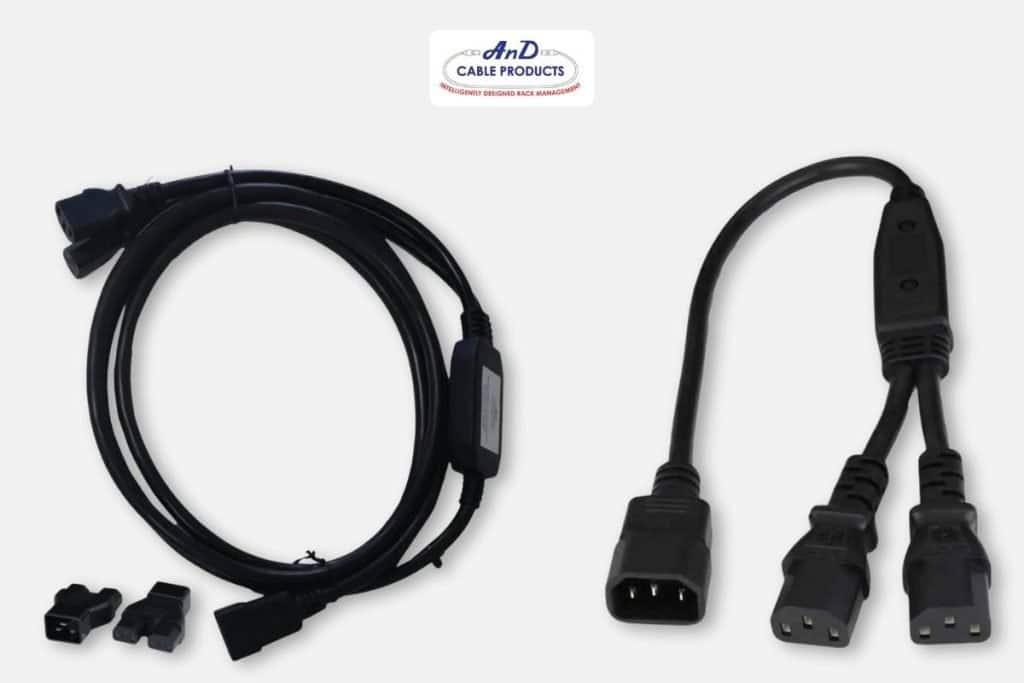
C14 to C13 Splitter, C19/C20 splitters, and other variations

Label Everything

When you’re using multiple Y cables, labeling becomes essential. Mark each cable with its load capacity and identify which rigs it powers. This practice simplifies troubleshooting and lowers the risk of accidentally overloading a circuit.

Test and Monitor

Don’t just plug everything in and walk away. Monitor the rigs for a test period, ensuring no breakers trip and no cables overheat. Keep an eye on temperature, hashing performance, and any anomalies in power draw.

Adjust and Scale Strategically

As your farm grows, regularly revisit your power distribution strategy. Maybe your existing circuits can handle additional rigs via Y cables, or perhaps you need new lines to safely support your expansion. Stay flexible, and don’t be afraid to redesign as new equipment and higher-power ASICs become available.

Get Your Y Power Cables at AnD Cable Products

AnD Cable Products offers a wide selection of high-quality Y power cables, including C14 to C13 y splitter power cords and C19/C20 splitters, designed to meet the demanding requirements of crypto mining operations.

Y Power Splitter Cable featured item in AnD Cable Products promotion

Y power cables – otherwise known as a y power splitter cable, C14 Y Cable, or 2-Way Power Cable – can be a powerful ally in the world of crypto mining. By consolidating two mining rigs under one safely rated circuit, you reduce costs, streamline your racks, and accelerate deployment. That said, strategic usage is key. Proper power calculations, high-quality cables, and ongoing monitoring ensure you don’t sacrifice safety or reliability for the sake of efficiency.If you’re ready to maximize rack space and cut power-related expenses, consider adding y splitter power cables to your toolkit. Used well, they’re more than just a convenience – they’re a competitive edge in an ever-evolving crypto landscape. With the right planning, you’ll see tangible benefits in your bottom line, all while maintaining a secure and efficient mining operation.

Your Y Power Cable Usage Starts Here!

FAQs

What are Y power cables?

Y power cables, also known as Y splitter power cables, C14 Y cables, or 2-Way power cables, are designed to power multiple devices from a single power source. The cable has one male connector that splits into two or more female connectors.

What are the key benefits of using Y power cables?

–Cost reduction: By allowing a single power distribution unit (PDU) outlet to power two devices, you can reduce the number of PDUs and cables, lowering material and management costs.

-Streamlined cable management: Y cables can halve the number of long cords in your racks, leading to a more organized setup, better airflow, and simpler maintenance.

-Faster deployment and expansion: The plug-and-play nature of Y cables can accelerate the process of getting new equipment online, as you may not need to install additional circuits if existing ones have capacity.

Where are Y power cables commonly used?

Y power cables are particularly useful in environments like crypto mining facilities and data centers, where efficiently powering high-density equipment is critical for reducing costs and improving operations.

What are the safety considerations when using Y power cables?

–Avoid overloading circuits: Never use a Y cable to exceed the rated capacity of the cable, PDU outlet, or circuit breaker. The total power draw of all connected devices must be within safety limits to prevent a serious fire hazard.

–High-power ASICs: It is not recommended to use Y splitters with very high-power ASICs that individually draw close to the outlet’s maximum capacity.

–Single point of failure: Using a Y cable means both devices connected to it will lose power if the single source connection fails. This should be considered in environments where uninterrupted power is critical.

How can I ensure safe and efficient usage?

–Proper power calculations: Always calculate the total power draw of your devices to ensure they are within the rated capacity of your cables and circuits.

–High-quality cables: Use high-quality Y power cables that are properly rated for your equipment.

–Ongoing monitoring: Regularly monitor your power usage and equipment to ensure everything is operating safely.

About the Author – John Lester

John Lester - General Manager, AnD Cable Products

John Lester, General Manager at AnD Cable Products, brings a rich tapestry of IT and project management experience to the forefront of cable management solutions for data centers. His career, spanning over three decades, includes significant roles in IT project management and consultation with renowned companies. John served in the Marine Corps during Desert Storm. John’s journey in the tech world is further distinguished by his proficiency in advanced programming and systems expertise. 

His leadership at AnD Cable Products encapsulates a blend of innovation, strategic planning, and a relentless commitment to delivering excellence in the field of data center infrastructure.  John was with AnD Cable Products when Louis was designing his innovative Zero U cable management racks and Unitag cable labels, both of which have become industry-leading network cable management products. AnD Cable Products only offer products that are intelligently designed, increase efficiency, are durable and reliable, re-usable, easy to use or reduce equipment costs. He is the co-author of the Cable Management Blog, where you can find network cable management ideas, server rack cabling techniques and rack space saving tips, data center trends, latest innovations and more. Visit https://andcable.com or shop online at https://andcable.com/shop/
Posted on

Edge Computing – A Contrast to Colocation

Featured image of edge computing server cabinets

Edge computing is an innovative strategy that moves data storage and processing closer to users and data sources. On the contrary, colocation utilizes a third party’s centralized area and data to share resources and space with our clients. Although it may appear that location differentiates the two, there are still many other distinctions that make them suitable for different uses and needs. 

In 2025, the world’s data creation is forecast to hit a new record high of over 180 zettabytes. Of course, this will inevitably increase the demand for low-latency and high-bandwidth applications. As a result, it paved the way for new and improved data processing paradigms like edge colocation. As the name implies, it combines the best of edge computing and colocation to address the drawbacks of both and provide a better and more convenient solution to customer needs. 


Key Takeaways

By the end of this article, you’ll know:

  • What edge computing is and its advantages and applications.
  • What colocation is and its advantages and applications.
  • What an edge data center is and their use cases.
Rows of server cabinets used for Edge Colocation

What Is Edge Computing

Edge computing is a method that places data processing and storage at the network’s “edge,” where it’s closer to both resources and users. Since discovering the “edge,” edge computing has become a vital modern technology. After years of relying on huge rooms as centralized data centers, edge computing decentralized the processing across multiple edge nodes or devices to create local networks and servers. Since then, it has provided numerous functions and solutions to a wide range of users. 

Because it reduces the distance between data sources and users, edge computing has a faster response time, less bandwidth consumption, better security, and many other benefits. Since it processes data on-site, it’s highly reliable, provides real-time data, works efficiently on on-demand applications, and more.

Read Specific Use Cases for Edge Computing

Advantages of Edge Computing

Edge computing offers several benefits that make it an attractive and valuable approach in today’s digital landscape:

Reduced Latency

Edge computing reduces data transmission latency to centralized data centers by processing data closer to the source or end-users. This reduction in latency is critical for applications that require real-time data processing, such as autonomous vehicles, industrial automation, and immersive virtual reality experiences.

Improved Performance

Because data processing occurs locally, performance and response times improve, enhancing the overall user experience and allowing time-sensitive applications to function smoothly.

Bandwidth Optimization

By processing and filtering data at the edge, edge computing helps optimize bandwidth usage. The central cloud or data center receives only relevant or summarized data, reducing network traffic. As a result, it saves bandwidth and minimizes the costs associated with data transmission.

Enhanced Reliability

Edge computing improves reliability by reducing reliance on centralized data centers. This function guarantees the continuity of data processing during connection or network failures. Hence, edge computing is particularly essential for mission-critical applications that cannot afford any downtime.

Scalability and Flexibility

Edge computing makes it possible to scale applications efficiently as demand changes. This means that services and applications can be changed at the network edge without requiring significant infrastructure changes for the company.

These advantages of edge computing make it a compelling solution for various applications and industries. In today’s data-driven, interconnected world, edge computing can open new doors, boost efficiency, and improve user experiences.

Person looking at graph with edge computing text overlay

Use Cases for Edge Computing

Edge computing has been beneficial to many use cases, such as the following:

  • Autonomous or Self-driving Cars

Edge computing allows real-time data processing from the vehicle’s sensors. As a result, it enables cars to process information quickly, allowing them to avoid obstacles, make decisions, and navigate autonomously. 

  • Healthcare

It allows accurate data collection and processing from medical devices in real time. Additionally, it’s essential for medical devices that must monitor a patient continuously and aren’t reliant on network connectivity. Furthermore, edge computing can improve healthcare services in rural and remote areas by allowing faster access to patient information, diagnosis, and treatment. 

  • Manufacturing and Industrial

Edge computing can also improve efficiency and productivity in factories and industrial settings. It monitors operations, controls equipment and machines, and performs other real-time tasks. It’s also useful for energy efficiency monitoring, predictive maintenance, and more. 

  • Retail

It is also helpful in processing retail sensors and other applications, allowing faster and more accurate inventory management, better customer service, and even loss or fraud detection. 

  • Human Resources (HR)

Edge computing offers numerous advantageous use cases for Human Resources (HR) departments across various industries. One prominent use case is the integration of edge devices and sensors in the workplace to gather real-time data on employee attendance, well-being, and safety.

Edge computing also makes security more robust for organizations, reducing the amount of data transmitted and processed in the cloud. That means sensitive data are less vulnerable to attacks. HR departments from established companies can deploy more secure tools exclusive to the organization for employee queries, performance, and requests. 

  • Universities

Edge computing enhances a university’s capabilities in processing and analyzing large volumes of data significantly faster. For academic researchers and doctoral students, this means more frequent breakthroughs and innovation.

Edge computing also enhances Internet of Things (IoT) capabilities. By installing servers closer to devices, they can perform better. End users will experience reduced latency, while universities will benefit from less bandwidth consumption.  

Edge computing has become a significant part of many businesses and industries by processing data from sensors, cameras, machines, smart devices, etc. 

What Underlying Concept Is Edge Computing Based On

Edge computing is based on the concept of distributed computing. The idea is that instead of a centralized data center or central cloud, it distributes data processing and storage across multiple devices. Edge computing processes data closer to the “edge,” where the users and sources are. Since it’s not reliant on a central cloud for data processing, it reduces the number of “hops” the data must travel. As a result, it saves on bandwidth, makes real-time responses, performs better, and can function independently even with a poor network connection.

What Is Colocation

Colocation is the method of renting a space from a third-party colocation data center facility. It gives you access to the facility’s resources, infrastructure, and services other renters share. Colocation can be a more cost-effective and secure option than building and maintaining your data center. 

What Is a Colocation Data Center

Colocation data centers are huge facilities that house servers and resources many users share. These centers offer physical security, hardware maintenance, storage, servers, and other efficiency resources. Typically, space is rented per rack, room, cabinet, or area unit. Many companies and businesses prefer colocation, particularly if they need space to house the equipment and wish to avoid the hassle of maintaining network servers and infrastructure. 

Advantages of Colocation

Colocation has several advantages that make it ideal for many companies, such as:

Space and Lower Expenditure Costs

Of course, the most appealing colocation assets are space and cost savings. Whether you’re a startup, a small business, or a large corporation, space is valuable. Colocation provides space and security, power systems, cooling, etc., so you can save on overhead expenses.

Scalability and Flexibility

Because you can easily rent more space and add more applications, scaling as your business expands is also convenient.

Skilled Staff and Maintenance

Experts and personnel in data centers can help monitor and maintain hardware, equipment, and other systems to ensure everything runs at peak performance. 

Better Security

Security personnel can ensure that no one comes into contact with any of the company’s sensitive information or data. Furthermore, experts in data centers can also help design applications and network security to help manage risks and other cyber threats. 

Colocation is becoming a more popular option for businesses of all sizes – not just giant organizations. It’s a great choice if you’re looking for a cost-effective, secure, and scalable way to host your data and applications. 

Use Cases for Colocation

Colocation is excellent for small businesses and large corporations requiring space and security for their tech infrastructure. Here are a few use cases that work well with colocation

  • Financial institutions

Financial institutions, such as banks that need an extra level of security benefit from colocation. Physical security and expert risk managers help protect clients’ personal information and the company’s assets.

  • E-commerce

Online businesses can thrive with strong connectivity without building additional infrastructure, cutting costs, and saving space. 

  •  Technology Companies

Many tech companies also use colocation to house high-powered hardware and other applications that require reliability and security. 

As the digital world expands and the need for connectivity of resources becomes more valuable, colocation will undoubtedly play a significant part in the future and evolution of data centers. 

Key Differences Between Edge Computing and Colocation

Edge computing and colocation have many key differences. Here are some of them:

Edge ComputingColocation 
Location and Proximity to End-UsersCloser to the end-usersA separate and distant area away from the end-user
Infrastructure and HardwareSmaller, more distributed data units or devices

Hardware is smaller, more efficient, and can be moved anywhere
Large and centralized data centers

More extensive and powerful hardware that can handle big operations shared by multiple users
Scalability and FlexibilityScalable as you can add resource requirements based on business needs

Flexible because it can be used to support a wide variety of applications
Also scalable since you can simply rent more or less space Also flexible because you can customize it on demand

Biggest difference is that colocation data centers can handle massive upgrades
Cost and MaintenanceTypically more expensive since it requires specialized hardware and software to process on the “edge”

Regular maintenance and updates can also be costly
It can be less expensive as multiple users can share maintenance costs

Users only pay for bandwidth and resources that they need
Best forApplications that require real-time processingApplications that require high availability and depends more on data storage than dynamic processing

What Is Edge Colocation

Simply put, edge colocation is edge computing implemented through colocation. It’s a combination of strategically located data centers and high-performance systems. Its edge data centers have eliminated the need for businesses to construct new facilities for their edge computing needs and have it handled by a third-party organization that offers colocation and edge computing services. Additionally, since the data travels a shorter distance because these data centers are located close to the end user, performance is also better and more efficient. 

Black colocation server cabinets that are edge ready

What Is an Edge Data Center

Edge data centers are smaller “colocation” facilities located closer to the network’s edge. An edge colocation data center is a type of edge data center that provides faster content delivery with minimal latency because it is located close to the population it serves. 

When choosing a data center, there are several factors you should consider aside from location, such as:


Save Thousands and Generate Millions in Revenue

For data centers, on the other hand, one way to ensure savings and smarter hardware expansion and footprint usage is to use optimization devices. One that allows your data center engineers to use all of your server rack units (RU) is through a Zero U Cable Manager. 

This server rack cabinet management tool allows you to replace the traditional 1RU or 2RU cable managers that use unnecessary space. For already established data centers, you can recover up to 30% of your rack units by installing a Horizontal Zero U Cable Management Shelf. That means you get to free one whole server rack cabinet for every three optimized cabinets to secure more storage, switches, and other devices without paying thousands of dollars. 

For edge colocation data centers where floor space management is paramount, Zero U cable managers are no longer a “nice-to-have” upgrade but a necessity. 

Side-by-side comparison of 1U and Zero U cable manager

Who Is Edge Colocation For

Edge colocation can be an exceptional option for companies that need high-performance applications or services for many users in a particular area or region. It can benefit organizations and industries looking to enhance their software and services’ efficiency, security, reliability, and cost-effectiveness.

Use Cases of Edge Colocation

Here are some use cases that benefit from edge colocation:

  • Telecom

As we move to 5G, there is a greater opportunity to place network function virtualization (NFV) nodes further from antennas while keeping base stations near their communities. Instead of building a bigger server in one location, they can cut costs by creating smaller servers and distributing them to different areas. 

  • Bare-metal Services 

Meta’s bare metal offerings on edge colocation allow applications and services to run on physical servers at the network’s edge at a lower cost because you can rent space or pay by the hour. Edge colocation can offer high performance, flexibility, and more control.

  • Virtual Machines (VMs) or Containers

Edge colocation’s reduced latency, better connectivity, improved security, rapid scaling, and portability can benefit high-powered VMs and containers. For example, a gaming company could use edge colocation to host its game servers closer to end users. Of course, it’s expected to result in better connectivity and performance.  

Edge colocation is expected to grow rapidly in the coming years due to the increased use of the IoT, 5G, and the demand for greater security. 

Data Center Companies

There are already a growing number of data center companies worldwide. Here are some of the leading names:

  • Digital Realty

Another leading data center and cloud solution provider, it has a global footprint that connects over 310+ data centers across 25+ countries.

  • Equinix

Equinix is another global leader in data center and colocation services for enterprise networks and cloud computing. It has 248 data centers in 27 countries on five continents. 

  • NTT Communications

NTT Communications is a global provider of cloud, managed data center services, and IT solutions. They have over 200 data centers in 70 markets across the Americas, Europe, and Asia.

These are just some of the many data center companies around. When selecting an edge data center provider, it is critical to consider your specific company’s needs and requirements.

Should Your Organization Use Edge Colocation Services

As the amount of data used and created at the edge boosts, colocation at the edge is becoming increasingly crucial. Selecting the right data center is crucial if you think edge colocation will benefit your company. You also need the right equipment and configuration to maximize efficiency and space in the data center. 

Data Center Cabinets

The 5G revolution, Edge Computing and the demand for Distributed Data requires data centers to become greater in capacity and ability. This simultaneously increases the complexity and difficulty in managing the data center infrastructure.

The amount of data centers required for processing the exponentially increasing amounts of data for streaming, Al, AR and the Internet of Things (IoT) also puts a greater demand on capital expenditures. Companies must scale upwards quickly but efficiently with an eye on both performance and economy. lT executives are given a seemingly impossible task to expand services, improve efficiencies, manage the growth and stay within an already stretched budget.

All-in-One IT Cabinet by Rakworx with text overlay showing  benefits

Modular Data Center Solutions

In addition to precisely prefabricated, modular structures and components, these high-quality Modular Data Centers efficiently utilize natural air and an evaporative cooling system to help maximize productivity from the lT infrastructure. Intelligent power distribution systems help self-monitor and regulate all activities within the structure.

Find out more about Modular Data Centers

At AnD Cable Products, we understand these challenges. We offer everything your data center needs, from Zero U Rack Solutions to every type and style of cable you need. We can customize cables for your application and offer various other hardware solutions to help your business succeed and grow. When you are ready to upgrade your cables, make moves and changes, or even deploy a new colocation or edge colocation data center or edge computing center – contact us at (800) 394-3008 or click HERE for a FREE 30-day TRIAL of our Zero U Cable Managers.

FAQs

What is the fundamental difference between edge computing and colocation?

Edge computing moves data processing and storage to the “edge” of the network, closer to the users and data sources. This is a decentralized model. In contrast, colocation is a centralized model where a business rents space in a third-party data center to house its own servers and equipment.

What are the key benefits of edge computing?

Edge computing provides several benefits, including reduced latency and improved performance because data doesn’t have to travel to a distant, centralized data center. It also offers enhanced reliability as it reduces reliance on a single central data center, and it optimizes bandwidth by processing data locally.

What are the advantages of using a colocation data center?

Colocation offers several benefits, such as cost savings on infrastructure and maintenance. Businesses can leverage the provider’s physical security, power, cooling systems, and skilled staff without the high costs of building and maintaining their own data center. Colocation also provides scalability, allowing companies to easily rent more space as their needs expand.

What is an edge data center?

An edge data center is a smaller colocation facility located closer to the network’s edge. It provides faster content delivery with minimal latency because it is located close to the population it serves.

How can edge computing and colocation be combined?

The article mentions a concept called edge colocation, which is a combination of both approaches. It utilizes strategically located data centers to implement edge computing, allowing businesses to use third-party facilities for their edge computing needs. This hybrid approach helps to address the drawbacks of both individual methods.

About the Author

Louis Chompff - Founder, AnD Cable Products, Rack and Cable ManagementLouis Chompff – Founder & Managing Director, AnD Cable Products
Louis established AnD Cable Products – Intelligently Designed Cable Management in 1989. Prior to this he enjoyed a 20+ year career with a leading global telecommunications company in a variety of senior data management positions. Louis is an enthusiastic inventor who designed, patented and brought to market his innovative Zero U cable management racks and Unitag cable labels, both of which have become industry-leading network cable management products. AnD Cable Products only offer products that are intelligently designed, increase efficiency, are durable and reliable, re-usable, easy to use or reduce equipment costs. He is the principal author of the Cable Management Blog, where you can find network cable management ideas, server rack cabling techniques and rack space saving tips, data center trends, latest innovations and more.
Visit https://andcable.com or shop online at https://andcable.com/shop/

Posted on

Optimize Your Data Center for a Potential Downturn – Doing More With Less

Feature Optimize Your Data Center for a Potential Downturn - Doing More With Less - AnD Cable Management Blog

With every recession, companies make valiant attempts to reduce their spending. One of the first things to go is marketing. Then the C-Suite starts to look for other potential savings, including in the area of servers and data management. But the need to process and analyze data, access the internet, and other tasks doesn’t go away. To be competitive, data centers also need to cut costs, and find ways to do more with less. 

Sometimes this involves moves and changes that, while they cost time and even money to implement in the short term, will result in later gains in the long term. Let’s look at some strategies that can help optimize your data center.


Key Takeaways

By the end of this article, you’ll know:

  • How optimizing server configurations can lead to cost savings.
  • How improved airflow leads to long-term savings.
  • How remote monitoring can save time and money.

Optimize Server Configurations 

One of the best ways to cut costs is to optimize your server configurations. Servers will use less floorspace, giving you room to add new servers in the same number of square feet. 

How do you do this? Well, first you start by replacing your existing Cable Management racks, with Horizontal Zero U Cable Management Racks. This unique design is used to mount ZeroU Cable Managers in the same U space as the active component, replacing conventional 1U and 2U cable managers and recovering rack space which can now be used for active devices.

When you use An D Cable’s slim 4” Vertical Cable Managers, (VCM), you can save even more space allowing you to gain floor space and move racks closer together.

This alone can result in a cost savings of between $4,000 and $9,000 per 4 system installations.

But that’s just the start of how you’ll save money. When you use AnD Cable Products’ slim 4” Vertical Cable Managers (VCM), you can save even more space, as they enable you to gain floor space by moving the racks closer together.

Below is a Whitepaper we’ve written that will take you through this step-by-step.

WHITEPAPER – Optimizing Server Cabinet Rack Space to Maximize Efficiency and Reduce Costs

Optimizing Server Cabinet Rack Space to Maximize Efficiency and Reduce Costs FREE Guide - AnD Cable Products

Smart optimization can help you increase rack space and realize significant equipment cost savings. Read our step-by-step guide that shows you how – and how much you could save.

  • How Much Rack Space You Could Save
  • How to Optimize for Maximum Efficiency
  • Savings for New and Retrofit Installations
  • Overall Cost and Space Savings Post-Optimization

Improve Airflow for Greater HVAC Efficiency

Not only do Zero U Cable Management Racks save space, but they can also help you improve server airflow no matter what your HVAC configuration. Not only are “spaghetti mess” wires ugly and potentially damaging, but they also impede airflow. This results in higher operating temperatures and reduced efficiency along with the potential damage to equipment. 

But also as rack density increases, so do challenges to HVAC systems. This is why hot and cold aisle containment, assisted by the right rack systems and better cabling solutions is essential. This is true for both hyperscale data centers and edge data centers. Whether hot or cold aisle containment is right for you will depend on your situation. 

But either way, optimizing your rack space is just the first step. Adding the right containment plan and HVAC solution can also save you a lot of money in the long run. 

Use Remote Monitoring

With modern technology, it is easy to monitor data centers remotely. This is through physical layer network security, monitoring, and control systems. Through this solution, you can not only monitor your systems, but often make control changes as well.

This eliminates temperature changes from workers entering and exiting the data center floor, saves time and money spent on on-site personnel, and can facilitate repairs by pinpointing problems and taking the guesswork out of repairs. 

A cloud server means monitoring can happen anywhere, managers and technicians can receive real time alerts, and solutions can be immediately deployed. It’s one of the best ways to do more with less. 

Go Green When Possible

Finally, there are infinite ways to go green with your data center. Not only are renewable energy sources available, but there are many ways to conserve energy. Many are listed above, like server optimization, hot and cold aisle containment, and remote monitoring. But there are also countless examples of how Amazon, Facebook, and other tech giants are “greening” their data centers. 

With the greater demands of AI, remote work, and increased internet speeds and 5G demands, these steps are more important than ever. Green initiatives are vital to energy and cost savings over time. 

A global recession still looms, and while it may be short lived, there are always ups and downs in any industry. Preparing for the next downturn is not just taking advantage of savings now, but it a viable way to plan for a better, more sustainable future. That sustainability impacts not only your business, but the companies you serve and the planet we all live on. 

Doing more with less isn’t just a short term solution. It’s a better way of doing business. Make a start by Contacting Us to discuss your needs.

FAQs

Why should a company optimize its data center for a potential downturn?

With every recession, companies look to reduce spending. By optimizing the data center, a business can cut costs and find ways to “do more with less” without sacrificing the essential functions of processing and analyzing data.

What are some strategies for optimizing a data center to reduce costs?

-Optimizing server configurations to use less floor space.

-Improving airflow for greater HVAC efficiency.

-Using remote monitoring systems.

-Going green when possible.

How does optimizing server configurations save money?

By replacing existing cable management racks with Horizontal Zero U Cable Management Racks and using slim Vertical Cable Managers (VCM), companies can save space and add new servers within the same footprint. This can result in significant cost savings, estimated to be between $4,000 and $9,000 for a 4-system installation.

How does improving airflow contribute to cost savings?

Poorly managed cables can impede airflow, leading to higher operating temperatures and reduced efficiency. By using products like Zero U Cable Management Racks and implementing hot and cold aisle containment, data centers can improve airflow, leading to greater HVAC efficiency and lower energy costs.

What is the benefit of using remote monitoring?

Remote monitoring, through physical layer network security, monitoring, and control systems, allows managers and technicians to monitor systems and make changes from anywhere. This eliminates temperature changes from personnel entering the data center, saves time and money on on-site staff, and facilitates repairs by pinpointing problems.

About the Author

Louis Chompff - Founder, AnD Cable Products, Rack and Cable ManagementLouis Chompff – Founder & Managing Director, AnD Cable Products
Louis established AnD Cable Products – Intelligently Designed Cable Management in 1989. Prior to this he enjoyed a 20+ year career with a leading global telecommunications company in a variety of senior data management positions. Louis is an enthusiastic inventor who designed, patented and brought to market his innovative Zero U cable management racks and Unitag cable labels, both of which have become industry-leading network cable management products. AnD Cable Products only offer products that are intelligently designed, increase efficiency, are durable and reliable, re-usable, easy to use or reduce equipment costs. He is the principal author of the Cable Management Blog, where you can find network cable management ideas, server rack cabling techniques and rack space saving tips, data center trends, latest innovations and more.
Visit https://andcable.com or shop online at https://andcable.com/shop/

Posted on

Choosing the Right Power Cord – Rack Optimization Tips

Choosing the Right Power Cord - Rack Optimization Tips - AnD Cable Management Blog

There are several aspects of optimizing data centers, from making the best use of space, time, power, and personnel. But there are some surprisingly simple solutions that are often overlooked with power cords, especially when it comes to rack optimization. Here are just a few of them.


Key Takeaways

By the end of this article, you’ll know:

  • The advantages of SVT power cords over traditional SJT cords.
  • The best cable to pair with zero U cable management racks to often more than double rack space.
  • The importance of keeping up with evolving technologies.
Choosing the Right Power Cord - Rack Optimization Tips - AnD Cable Management Blog

SVT vs. SJT Power Cords

One of the first needs of a data center is power, and while there are debates about DC powering data centers, for the most part, AC power is the answer, and that means that a part of rack optimization includes the routing of power cords. 

Related to that is the durability of these cords, their flexibility, and to an extent their cost. However, there is a certain resistance to making the switch from more common SJT cords to their younger, smaller brother, SVT power cords. 

The issue is primarily perception. SJT power cords are thicker, so they must be better, right? The answer is more complex than that. To understand, we need to look briefly at what these cords actually do:

  • Deliver power safely to components in the rack system
  • Have the flexibility to be routed through racks and between delicate components
  • Must be color coded to assist with organization and prevent mistakes during moves and changes

That sounds pretty basic, right? Power cables, and many other cables used in data centers essentially are. So why choose one over the other?

SVT Power Cord Advantages

The primary difference between SVT and SJT cords is thickness, which plays a significant role. Both are portable, can be color coded, easily withstand the heat of the data center environment, and are capable of carrying the exact same loads. 

SJT cords have been standard for a long time, and their thickness may make them seem “tougher”. But thinner SVT cords are capable of more bend angles, take up less room (facilitating airflow), and are lighter. These aid rack optimization and organization.

But of course, SVT cords also cost less per unit. Over large moves and changes or even when designing a new data center, this can make a huge difference. 

In this case, thinner (and cheaper) is better. 

Power Cords are Only Part of the Picture

Of course, when we start talking about power cords, it is important to go back to some of the basics of rack optimization. 

  • First, use 28 AWG “skinny” patch cords. They are 36% thinner than other cables, which allows you to use high-density patch panels. This simple change in cords saves you a lot of rack space, and cuts the RU needed for patch panels in half. Skinnier patch cords also allow for more airflow as well
  • Second, replace 1RU and 2RU horizontal cable managers with AnD Cable Products Zero U Cable Management Racks. They’ve been designed to not take up the valuable vertical space typical cable managers do, but instead install in the same U as the device, saving significant rack space

Once you have done these two things, you’ll often more than double the ports you can fit in a single rack. Not only will you save space and money, and prevent the spaghetti mess of wiring often found in server racks after moves and changes, but you will save additional rack footprints, allowing you to increase density without losing computing power or memory. 

WHITEPAPER – Optimizing Server Cabinet Rack Space to Maximize Efficiency and Reduce Costs

Optimizing Server Cabinet Rack Space to Maximize Efficiency and Reduce Costs FREE Guide - AnD Cable Products

Smart optimization can help you increase rack space and realize significant equipment cost savings. Read our step-by-step guide that shows you how – and how much you could save.

  • How Much Rack Space You Could Save
  • How to Optimize for Maximum Efficiency
  • Savings for New and Retrofit Installations
  • Overall Cost and Space Savings Post-Optimization

Optimizing Other Cables

There are other steps you can take as well. Optimizing your Ethernet cables (while taking into account power, latency, and reach), looking at Direct Attach Copper (DACs) cables, Active Optical Cables (AOCs), and fiber optic cable assemblies for optimization opportunities, and keeping up with innovations like plastic polymer cables can also set you up for the most optimal use of cables and cords in your data center.

The last item highlights perhaps the most important thing you can do to optimize your data center: keeping up with evolving technology. There are always new developments, faster and lighter cords, better power solutions, and more. Consider what you can do each time to make moves or changes to increase the efficiency of your data center no matter what size it is.

The good news is, you don’t have to do this alone. At AnD Cable, we keep up with the newest and best solutions for everything you need for your data center, from racks to cable management to cords and cables. We offer remote monitoring solutions and more. 

Have questions about data center solutions? Do you want to talk about optimizing your  rack usage and cable management? Get in touch today! We can’t wait to start a conversation about how we can help you. And if you’re ready to get started, request a quote. We’ll be with you every step of the way. 

FAQs

What is rack optimization?

Rack optimization is the process of making the best use of a data center rack’s available space, time, power, and personnel.

What are the benefits of using SVT power cords over traditional SJT cords?

SVT cords are thinner and lighter than SJT cords. This allows them to take up less space, facilitate better airflow within the rack, and offer more bend angles for easier cable management, all of which contribute to better organization and increased density.

What is the difference between SJT and SVT cords?

SJT stands for “Service Junior Thermoplastic” and has been the industry standard for a long time. SVT stands for “Service Vacuum Thermoplastic” and is a newer, thinner, and more flexible type of power cord.

What other products are recommended for improving rack density?

The article recommends using 28 AWG “skinny” patch cords, which are 36% thinner than standard patch cords, and AnD Cable Products’ Zero U Cable Management Racks to replace traditional horizontal cable managers.

How can these changes lead to cost savings?

By using thinner cables and improved cable management, you can double the number of ports in a single rack. This increased density reduces the need for additional rack space and can lead to significant cost savings.

About the Author

Louis Chompff - Founder, AnD Cable Products, Rack and Cable ManagementLouis Chompff – Founder & Managing Director, AnD Cable Products
Louis established AnD Cable Products – Intelligently Designed Cable Management in 1989. Prior to this he enjoyed a 20+ year career with a leading global telecommunications company in a variety of senior data management positions. Louis is an enthusiastic inventor who designed, patented and brought to market his innovative Zero U cable management racks and Unitag cable labels, both of which have become industry-leading network cable management products. AnD Cable Products only offer products that are intelligently designed, increase efficiency, are durable and reliable, re-usable, easy to use or reduce equipment costs. He is the principal author of the Cable Management Blog, where you can find network cable management ideas, server rack cabling techniques and rack space saving tips, data center trends, latest innovations and more.
Visit https://andcable.com or shop online at https://andcable.com/shop/

Posted on

Hot and Cold Aisle Containment in Data Centers

Feature Hot and Cold Aisle Containment in Data Centers - AnD Cable Management Blog

Data centers are often made up of hot and cold aisles, and the design of the hot / cold aisle data center is far from new. However, the traditional setup causes warm air exhaust from one aisle to flow into the air intake of the next, meaning that the overall efficiency of the data center is impacted. And really, that’s what hot and cool aisle containment is all about.


Key Takeaways

By the end of this article, you’ll know:

  • The benefit of remote monitoring in temperature control.
  • What Hot, Cold, and Partial Aisle Containment methods are.
  • The importance of liquid cooling and airflow.
Hot and Cold Aisle Containment in Data Centers - AnD Cable Management Blog
Balancing hot and cold aisles is more important than ever to running an efficient data center

As rack density increases, especially in edge data centers and hyperscale data centers, the need for efficiency increases. This is also impacted by the fact that there are more green data centers, who may be generating their own energy using solar or other renewable resources. 

How does containment work and how does it impact your data center?

Remote Monitoring and Temperature Control

Of course, before we get to containment itself, it’s a good reminder to revisit physical layer monitoring. To know how effective any containment effort is, it’s necessary to monitor temperatures. This is most often done with temperature indicating panels, three per rack at the top, middle, and bottom, so that intake temperatures can be monitored regularly.

Of course, someone entering the area to manually check temperatures is yet another disruption to airflow, so remote monitoring as a part of physical network security is essential. This allows managers not only to monitor these temperatures, but receive alerts and take action if something goes wrong. 

A150 Remote Physical Layer Network Security Monitoring Elements
The A150 Remote Physical Layer Remote Monitoring system tracks temperature among many other elements that reduce risk and increase efficiency in data centers

But the most important fact for this discussion is to know what temperatures are so that efficiency and the effectiveness of containment can be monitored.

What is Aisle Containment?

Aisle containment is essentially isolating aisles by relative temperature. Essentially it means placing doors at the end of each aisle, and then adding panels, or barriers, from the top of the cabinet upwards. 

The more airtight this containment is, the more efficient cooling can be, and the easier it is to manage airflow. It’s pretty simple, but there are a couple of different approaches, each with its own pros and cons.

Hot vs. Cold Aisle Containment

There are two ways to manage aisle containment: hot and cold aisle containment. And they work exactly the way they sound.

  • Hot Aisle Containment: Hot aisles are contained, leaving the rest of the room at a more comfortable cool aisle temperature. It’s also easier to manage in many cases.
  • Cold Aisle Containment: Cold aisles are isolated or contained, which means the rest of the room stays at the warmer hot aisle temperature. This can also make getting the right amount of airflow tricky due to pressure changes, but managed properly it can deliver the most uniform temperature air to servers.. 

Choosing the right type of aisle containment for your data center depends on your situation, but there are some differences between new data center construction and retrofitting an existing data center.

Retrofitting vs. New Data Center Construction

In the case of a new data center, most of the time hot aisle containment is the method of choice. This is easier to set up in a new data center, as that allows you to start with the type of containment you need, and to set up HVAC systems and sensors to accommodate that. 

This creates an easier environment for technicians to work in when necessary, and is overall a more efficient choice. However, things are different when it comes to existing data centers

Existing data centers are easier to retrofit with cool aisle containment. While there is some additional monitoring, the way cooling systems work simply means this process is simpler in a currently operating system without creating expensive downtime for making moves and changes and installing containment. 

That doesn’t mean that no new data center will be built with cool aisle containment. It simply means that hot aisle containment is a more frequent choice. 

Partial Containment Solutions

When it comes to retrofitting, sometimes full aisle containment in either format is not possible. In those cases, partial containment is a solution. How is this achieved?

Often plastic strips can be used, similar to those you would go through walking into an industrial freezer or even certain restaurant kitchens. These can be hung at the end of aisles and from the tops of servers to the ceiling, just like other containment methods.

While not as effective, partial containment can be easy to retrofit and implement, and in some cases is about 75% as effective as full containment. For existing data centers looking for a quick and inexpensive efficiency solution, partial containment is a viable option. 

But containment is just a part of rack cooling solutions, and there are some new and exciting ones. 


WHITEPAPER – Optimizing Server Cabinet Rack Space to Maximize Efficiency and Reduce Costs

Optimizing Server Cabinet Rack Space to Maximize Efficiency and Reduce Costs FREE Guide - AnD Cable Products

Smart optimization can help you increase rack space and realize significant equipment cost savings. Read our step-by-step guide that shows you how – and how much you could save.

  • How Much Rack Space You Could Save
  • How to Optimize for Maximum Efficiency
  • Savings for New and Retrofit Installations
  • Overall Cost and Space Savings Post-Optimization

The Addition of Liquid Cooling

Data center cooling has evolved from older, inefficient systems to more contemporary ones in a relatively short period of time. However, one thing that has been around for a while but is experiencing a boom in denser, modern data centers is liquid cooling. 

Why? Well, in most cases liquid cooling is more efficient than air cooling in data centers, and when the two are used in conjunction, generally the best results can be achieved. The larger data centers get, the more power they consume, the greater the push towards a blended approach to cooling that not only saves power and is better for the environment, but prolongs the life of equipment and saves space as well. 

But even with the addition of liquid cooling, it’s all about efficient use of rack space and the airflow around them. 

It’s All About Airflow

No matter what kind of aisle containment is used, and no matter how efficient the cooling system, saving space, improving efficiency, and keeping things organized, maximizing rack space efficiency and airflow is vital.

That’s why data centers choose ZeroU racks and cable management systems. They not only help avoid the spaghetti mess and all the cable issues that can arise from it, but also help maximize airflow and save significant rack space in any system.

Whether you are retrofitting a data center or engaged in new construction, we have the rack system that’s right for you. 

Contact AnD Cable Products today for all of your cable, rack, and physical network security needs. We’d love to start a conversation about the right solution for you. 

FAQs

What is hot and cold aisle containment in a data center?

Hot and cold aisle containment is a data center design strategy that separates the hot exhaust air from equipment from the cold supply air. This is done by physically enclosing either the hot aisles or the cold aisles to prevent the mixing of air, which improves cooling efficiency and reduces energy costs.

What are the two main types of aisle containment?

The two main types are hot aisle containment and cold aisle containment. Hot aisle containment encloses the hot aisles, directing hot exhaust air directly to the cooling units. Cold aisle containment, on the other hand, encloses the cold aisles, keeping the cool air localized for the equipment intakes.

Which type of containment is better for a new data center?

For new data center builds, hot aisle containment is often preferred. It is generally easier to integrate with new HVAC systems and provides a more comfortable working environment for technicians, as the majority of the room remains at a cooler temperature.

Which type of containment is better for retrofitting an existing data center?

For existing data centers, cold aisle containment is typically the easier and more cost-effective option for a retrofit. It is a simpler process that can be implemented without significant downtime.

Can partial containment be used, and how effective is it?

Yes, partial containment is a viable solution when full containment is not feasible. This can be achieved using plastic strips or similar materials and is noted to be about 75% as effective as a full containment system.

Why is monitoring important for aisle containment?

Regardless of the containment method, remote monitoring and temperature control are crucial. They allow data center managers to assess the effectiveness of the containment efforts, identify any thermal inefficiencies, and optimize the cooling system for peak performance.

About the Author

Louis Chompff - Founder, AnD Cable Products, Rack and Cable ManagementLouis Chompff – Founder & Managing Director, AnD Cable Products
Louis established AnD Cable Products – Intelligently Designed Cable Management in 1989. Prior to this he enjoyed a 20+ year career with a leading global telecommunications company in a variety of senior data management positions. Louis is an enthusiastic inventor who designed, patented and brought to market his innovative Zero U cable management racks and Unitag cable labels, both of which have become industry-leading network cable management products. AnD Cable Products only offer products that are intelligently designed, increase efficiency, are durable and reliable, re-usable, easy to use or reduce equipment costs. He is the principal author of the Cable Management Blog, where you can find network cable management ideas, server rack cabling techniques and rack space saving tips, data center trends, latest innovations and more.
Visit https://andcable.com or shop online at https://andcable.com/shop/

Posted on

Edge Data Centers – Space and the Final Frontier

Edge of space - Edge Data Centers - Space and the Final Frontier - Cable Management Blog

Computing on the edge: it seems that everyone is doing it, from big industry to manufacturers, from ISPs to Cloud Computing centers. When you can locate computing and analytics power closer to machines connected via the IoT and other data sources, the faster you can gather data, and the more data you can store and analyze in a timely manner. For some, edge data centers seem like the final frontier for data.


Key Takeaways

By the end of this article, you’ll know:

  • The challenges faced by edge data centers.
  • The solutions for efficient space usage in edge data centers.
  • Economic impact of efficient space utilization.
Feature Edge Data Centers - Space and the Final Frontier - Cable Management Blog

This has resulted in data centers that vary in size, from the size of a very large cabinet to those contained in the space of a small shipping container. But like any journey to the edge, there are challenges and risks. There are two primary ones we will address here:

  • Temperature – Because of the small spaces edge data centers often occupy, airflow and temperature control can be tricky.
  • Space – Smaller size also means that saving space is critical, and on the flip side, can also enable more airflow and indirect cooling in a confined area.

In this way, the two primary challenges are related, and often a solution that mitigates one will also help mitigate the other. Let’s take a quick look at each of these.

Controlling the Environment on the Edge

The temperatures that edge data centers operate at are critical. And there is a huge difference between the cooling we need for a building designed to keep people comfortable, and a building designed to serve machines. Think of it this way: if someone opens the door to your office, you may feel a blast of warm or cold air, depending on the time of year. Your discomfort disappears quickly when the door closes, as the HVAC system takes over, and brings air back into the broad temperature tolerances humans can endure.

However, what happens when you go to an edge data center and open the door? The answer is, it depends on where it is. Large, brick and mortar data centers can be located in areas with minimal environmental challenges and low risk of natural disasters. But edge data centers must be located, well, where they are needed. That means in dusty and dirty environments, areas with extreme temperature fluctuations, and more.

There are really only two choices:

  • Develop and deploy equipment designed to withstand extremes, at a higher price point. A good example is cellular equipment like that developed by AT&T. However, the cost of this equipment is too high for standard edge data center deployment at scale.
  • Work with existing, readily available equipment and use unique strategies to combat environmental changes at a small scale, including using tents or shrouds for entry and exit, using handheld temperature and humidity monitors to evaluate current conditions, and developing strategic plans for unexpected events.

Another part of the solution is to use remote monitoring, AI and the IoT in edge data centers to mitigate the need for human intervention. Monitoring the health of equipment and preventing disaster in the first place is one of the keys to efficient management of edge data centers.

This is but one of the challenges data center managers face. The second is the efficient use of available space.

Saving Space

While cooling and environmental control are critical, so is the efficient use of space. This can result in increased airflow and easier HVAC solutions while also enabling more servers to be installed in the same amount of space.

This involves a few key steps:

  • Rack Selection – Whether a data center uses 23” or 19” racks, there are rack solutions that take up less space, and are also able to use better rack management options.
  • Cable Management – ZeroU horizontal cable managers makes more room for servers in a single rack, and they prevent the “spaghetti mess” that can happen in server racks, and be especially problematic in edge data centers that are more compact.
  • Compact Vertical Cable Management – 11U cable managers also save space and keep cables organized and easy to access should moves, changes, or repairs be needed.

Anything that can be done to save space in an edge data center makes facing the other challenges related to environmental control easier, but it also has another impact: an economic one. The less space you need to get the computing power you need, the more compact your data center can be. Alternatively, this can give you space to scale as needed without creating yet another data center space.

At the edge, there are always challenges, but there are also solutions. From controlling the environment in and around the data center to using the space in the most efficient way possible, with the right equipment, these obstacles can be transformed into opportunities to change not only how much data is collected and how quickly it can be acted upon, but where it happens as well.

Do you have questions about saving space in your edge data center? Are you looking for remote monitoring solutions? Then contact us here at AnD Cable. We’d love to start a conversation about how we can help you.

FAQs

What is an edge data center?

An edge data center is a computing facility located close to data sources, such as those connected by the Internet of Things (IoT), to enable faster data gathering, storage, and analysis.

What are the main challenges associated with deploying edge data centers?

The two primary challenges are managing temperature fluctuations and efficiently using space.

How can temperature challenges be addressed in edge data centers?

Temperature control can be handled in two ways: by using specialized, expensive equipment, or by using more affordable, standard equipment with strategic solutions like remote monitoring, AI, and IoT to mitigate environmental changes.

Why is space efficiency so important for edge data centers?

Saving space is critical because it improves airflow and cooling, which helps maintain equipment performance. It also allows for more servers to be installed and provides room for future expansion.

What are some solutions for effective space management in edge data centers?

Effective space management can be achieved by selecting the right racks and implementing efficient cable management solutions, such as ZeroU horizontal and 11U vertical cable managers.

About the Author

Louis Chompff - Founder, AnD Cable Products, Rack and Cable ManagementLouis Chompff – Founder & Managing Director, AnD Cable Products
Louis established AnD Cable Products – Intelligently Designed Cable Management in 1989. Prior to this he enjoyed a 20+ year career with a leading global telecommunications company in a variety of senior data management positions. Louis is an enthusiastic inventor who designed, patented and brought to market his innovative Zero U cable management racks and Unitag cable labels, both of which have become industry-leading network cable management products. AnD Cable Products only offer products that are intelligently designed, increase efficiency, are durable and reliable, re-usable, easy to use or reduce equipment costs. He is the principal author of the Cable Management Blog, where you can find network cable management ideas, server rack cabling techniques and rack space saving tips, data center trends, latest innovations and more.
Visit https://andcable.com or shop online at https://andcable.com/shop/

Posted on

How to Design an Effective Data Center Cable Labeling System

How to Design an Effective Data Center Cable Labeling System - AnD Cable Management Blog

One of the things we talk about often in cable management besides having the right cable management and rack management systems that make your data center the most efficient, is using an effective cable labeling system.


Key Takeaways

By the end of this article, you’ll know:

  • The right tools for your data center cable labeling systems.
  • The importance of incorporating color and written details on labels.
  • Why you should have a consistent and standardized key of terms and abbreviations.

Jump to Section:

A cable labeling system makes effective cable management MUCH easier!

The reason is simple. Nearly every technician has said, at one point or another, “I wish I had labeled that.” So whether you are just getting started with labels or you are labeling existing systems, the question is the same. How do you design an effective cable labeling system? Here are some things to consider.

Reduce, Reuse, Recycle

First, use a reusable label system. Not only is this better for the environment, it is better for your system as well. For example, if you use UniTag reusable cable labels, they snap on (and off) so you can mark and identify cables quickly.

UniTag Cable Labels -  reusable cable labels allow you to mark and identify virtually any size cable or group of network cables and reduce your cable label costs
UniTag Cable Labels – reusable cable labels allow you to mark and identify virtually any size cable or group of network cables and reduce your cable label costs

But more importantly, if you change something or replace a cable, you simply remove the cable label and put it back on the new cable or in the new location. Easy, and with no waste. It saves time, too. There’s no need to reprint a label or find a different connector. 

Use the Right Cable Label Printer

This might seem like a no-brainer but starting with the right equipment when you’re developing an effective cable labeling system is just as important as when you are planning the layout or rearranging your data center. Ideally a label printer should be portable, have a large memory to load a variety of label styles, and should also be efficient.

Efficiency means long battery life, but also the efficient use of label cartridges. How often have you trimmed a label before applying it? Wouldn’t it be better of the label was the right size in the first place?

Epson LW-PX Printers are the most efficient on the market, working to continually save you money

Epson LW-PX printers have innovative technology that reduces lead margins and will “rollback” before printing to prevent that waste. They also have auto full and half cut features that allow you to print a variety of labels in the field, and the large storage capacity means you’ll always have the labels you need at your disposal, from custom created ones to dozens of industry standard symbols.

The other important feature is toughness. Everyone has that employee who frequently has a case of the “dropsies.” But accidents happen to everyone, and printers get dropped, fall off of racks, or suffer even worse treatment. The Epson printer body meets MilSpec drop tests, and has a built in handle that makes it easier to carry (and less likely to be dropped).

Starting with the right printer and the right reusable label tags is the foundation for your cable labeling strategy.

Color Coded Cable Labels

One of the downfalls of a labeling strategy can be too many labels of the same color, and several flag ties that make it challenging to see what is going on. Using a variety of colors in a color coded cable run helps you identify cables at a glance, and can help you follow cables more easily.

Because you can use the Epson labels on any size of cable or group of cables, you ‘ll reduce label clutter, which comes with a whole host of advantages.

Label Size and Information Matters

Sometimes you need more detail than you can put in one line of type. Use labels that are large enough to include multiple lines of type, so your labels make sense to everyone in the data center. Remember, you might not be the one coming back to work on that particular server, so the more detail you include in your labels, the better.

This also impacts readability. A color can tell the technician what type of cable they are dealing with. The label itself tells them the greater detail they need to know to follow the cable and troubleshoot quickly. The reason for labels is that moment later on when a technician is troubleshooting.

Consider the question, “What would another technician need to know about this cable to work efficiently?” That’s the information that should be included in your label.

Best practice guide to a three line cable label:

  1. Near end termination – Port number on patch panel or hub or wall outlet number or physical location
  2. Far end termination – Patch panel location or hub/switch location and port number
  3. Cable purpose – circuit ID or functional description of a cable or patch cord
Three lines of text on the cable label tape and plastic cable label provides lots of space to record vital information

Label Wherever You Can

For label tags, removable adhesive label tape may be the best choice, but there are other applications your printer and your labels need to serve. You may need to label a heat shrink tube, or you may want a fluorescent label for some applications.

Epson Labelworks PX printers offer different kinds of label cartridges to meet different needs. You should encourage technicians, and remember yourself, those moments when you wish you had labeled something, even if it isn’t a cable. Instead of thinking, “I wish I had labeled that,” you can say, “I’m glad I labeled that.”

Have a Standard Cable Labeling Nomenclature

No matter what cable labeling system you have and what printer you use to implement it, it will all be for nothing unless everyone is on the same page. Think of it: one technician might call a group of cables one thing, and another tech might label it differently, or not understand the label on the cable.

Not only is it important to label, but part of your labeling system should include a “key” of terms, abbreviations, and names. Everyone should use the same “key” or system. That way, there is no misunderstanding about what a cable run is, or what that abbreviation really stands for.

Final Thoughts

Are there any secrets to an effective cable labeling system? Not really. It’s pretty simple:

  • Use the right tags and equipment
  • Use color coding where appropriate
  • Be consistent with terms and labels
  • Label everything that you might wish later was labeled
  • Include all relevant details on your labels

With the right cable labeling system, you’ll save time, money, and energy. Your installers and technicians will be more efficient, and overall your data center will be more profitable.

Need help with your cable labeling system? Contact AnD Cable Products today. We’ll help you find the right solution to meet your needs.

Introducing the Ultimate Data Center Cable Labeling System

Cable Management Just Got More Economical, Efficient and Robust

AnD Cable Products and Epson Labelworks have teamed up to develop the Ultimate Data Center Cable Labeling System with a selection of bundled cable labeling products that, when used together will revolutionize your cable mangaement, efficiency and costs.

UniTag® Reusable Cable Labels – A plastic snap-on cable labeling system that provides a quick and easy way to mark and identify cables

Epson Labelworks PX Printers – A portable label and wire marker solution with exclusive time and costsaving features for creating custom labels

Epson’s PX Label Tapes Fit Onto AnD Cable’s UniTag® Cable Labels PERFECTLY!


FAQs

What is the primary benefit of a well-designed cable labeling system?

An effective labeling system can save significant time, money, and energy, ultimately making a data center more profitable by improving efficiency and reducing downtime during maintenance or changes.

What kind of labels should be used?

Reusable, snap-on labels reduce waste and save time when cables need to be replaced or changed.

What are the key features to look for in a label printer?

A good label printer should be portable, efficient, and durable. Features like reducing label waste and having a large storage capacity for label data are also important.

Why is a standardized naming convention important?

Having a standard nomenclature or a “key” with consistent terms and abbreviations is crucial to prevent misunderstandings and ensure all technicians can easily follow and maintain the system.

How can color-coding and detailed information be used effectively?

Color-coded labels help with quick visual identification of cables, while labels that are large enough to include multiple lines of detailed information provide essential context for technicians.

About the Author

Louis Chompff - Founder, AnD Cable Products, Rack and Cable ManagementLouis Chompff, Founder & Managing Director, AnD Cable Products
Louis established AnD Cable Products – Intelligently Designed Cable Management in 1989. Prior to this he enjoyed a 20+ year career with a leading global telecommunications company in a variety of senior data management positions. Louis is an enthusiastic inventor who designed, patented and brought to market his innovative Zero U cable management racks and Unitag cabel labels, both of which have become industry-leading network cable management products. AnD Cable Products only offer products that are intelligently designed, increase efficiency, are durable and reliable, re-usable, easy to use or reduce equipment costs. He is the principal author of the Cable Management Blog, where you can find network cable management ideas, server rack cabling techniques and space saving tips, data center trends, latest innovations and more.
Visit https://andcable.com or shop online https://andcable.com/shop/

Posted on

Server Rack Configuration and Cable Management Best Practices

Feature - Server Rack Configuration and Cable Management Best Practices - AnD Cable Management Blog

There are only three types of currency in the world: time, money, and expertise – and we can’t afford to waste any of them. You have the expertise needed to run a data center and you hire others with the same expertise. But there are two things you can always save in your data center: time and money.


Key Takeaways

By the end of this article, you’ll know:

  • How to optimize rack space.
  • The importance of proper organization and labeling.
  • How proper cable management and rack configuration is crucial for energy efficiency and equipment health.

Jump to Section:

Data center server rack configuration with proper cable management using best practices

It seems like we never have enough of either one, and time and money are often directly tied together. So how do you make the most of both every single day?

Perhaps the most important thing is to optimize wherever possible. Here are some ideas for you, things that will save you both time and money in your data center.

Use Your Rack Space Wisely

The more efficiently you use your rack space, the more you can fit in your data center. In a time when many data centers are experiencing a need for rapid growth, the ideal use of space is key. So what can you do?

  • Use the right sized racks for your equipment – Many components are moving to 23” cable management racks rather than 19” ones. Be sure you have the right server rack, so you are not wasting space and risking equipment damage.
  • Use smaller gauge cables where possible – This allows for more airflow and improved equipment efficiency while also taking up less valuable space.
  • Use Zero U cable rack managers – These will not only save you useful shelf space, but they are also easier to install, and can make repairs and changes faster too by giving technicians and installers more space to work on.

All of these things will make sure you are using your rack space in the very best way.

Avoid a Disorganized Server Rack

While racks rarely start out that way, additions, changes, and moves can result in a real mess at the rear of your server rack. Every technician has seen this from time to time, and it is not only a waste of time to sort through, but it can cost a data center in many ways.

Cables that are hanging unsupported like a curtain and not routed properly will often break at critical points, losing continuity. Connectors also suffer more wear and tear, and airflow is adversely affected, which is harder on equipment.

If you have a disorganized server rack get it cleaned up and optimize that rack as soon as you can. Use Velcro cable wraps and ties to bundle cables, and take the next time saving step, which involves labeling and organization.

Develop a Label Protocol and Label Everything

The ANSI TIA 606-B is a voluntary cable labelling standard, but one that helps data centers be as organized as possible. It involves setting up a consistent and standardized system for labelling cables and equipment. It involves using:

  • Permanent labels
  • Labels at both ends of the cables
  • Legible labels
  • Good record keeping of labeling protocols and physical locations
  • Color coding
  • A common nomenclature everyone understands

Once you have established a labeling protocol, ensure that everything is labeled. You never want to have to say, or hear someone on your team say, “I wish I had labeled that” again. Make labeling a standard procedure.

At AnD Cable Products, we offer everything from reusable cable labels to a variety of different sized Velcro cable wraps and zip ties for your cable management needs. Need something you don’t see on our website? Feel free to reach out and Request a Quote.

Optimize Your Data Center for Airflow

Whether you run cables under the floor or overhead, you need to have a plan to maximize airflow in your data center. This is easier on your HVAC system and better for your equipment overall. Any large variations in air temperature, pressure, or humidity will all impact your data center in one way or another.

This means using the right size and length cables, rack cable management in the room, and having an overall airflow plan in place. This includes all of the steps above, but adding the extra layer of understanding how each action you take will affect airflow.

Remote Monitoring and Automation

Finally, remote monitoring and automation mean fewer technicians in and out of the facility, which is easier on the HVAC systems and airflow efficiency, reducing costs. It also means you can spot problems before they start. You’ll know what is going on with cables before damage is visible to the human eye.

Not only will there be warnings and alarms related to problems, a remote monitoring system can reduce energy usage in your data center as well. This physical layer network security is often overlooked and not given the attention it should, but the right solution can save you both time and money.

There are only three kinds of currency. Time, money, and expertise. If you are going to use all of them to the best of your ability, you’ll need to save time and money in your data center. Need help or have questions about how to optimize your data center? We have answers and everything you need to get started today.


Optimizing Server Cabinet Rack Space to Maximize Efficiency and Reduce Costs

Optimizing Rack Space and Air Flow in Server Racks and Cabinets

Smart optimization can help you increase rack space and realize significant equipment cost savings. Read our step-by-step guide that shows you how – and how much you could save.

  • How Much Rack Space You Could Save
  • How to Optimize for Maximum Efficiency
  • Savings for New and Retrofit Installations
  • Overall Cost and Space Savings Post-Optimization

FAQs

Why is proper server rack organization important?

Proper organization is crucial to prevent cable breakage, equipment damage, and poor airflow. A well-organized rack is more efficient and easier to maintain.

How can I optimize server rack space?

You can optimize space by using appropriately sized racks, such as 23” instead of 19”, and by using smaller gauge cables. Implementing Zero U and vertical cable managers also helps to free up valuable shelf space.

What are the benefits of proper labeling for cables and equipment?

Consistent and legible labeling helps to maintain order and makes it easier to manage the infrastructure. The article recommends following a standard like the ANSI TIA 606-B for a uniform labeling protocol.

How does cable management affect airflow?

Disorganized cables can block vents and disrupt airflow, leading to equipment overheating and increased strain on HVAC systems. Proper cable management, such as bundling cables with Velcro, ensures optimal airflow and improves energy efficiency.

What is the role of remote monitoring and automation in a data center?

Remote monitoring and automation reduce the need for physical presence, save time, and allow for the early detection of problems. This helps to improve overall efficiency and reduce costs.

About the Author

Louis Chompff - Founder, AnD Cable Products, Rack and Cable ManagementLouis Chompff, Founder & Managing Director, AnD Cable Products
Louis established AnD Cable Products – Intelligently Designed Cable Management in 1989. Prior to this he enjoyed a 20+ year career with a leading global telecommunications company in a variety of senior data management positions. Louis is an enthusiastic inventor who designed, patented and brought to market his innovative Zero U cable management racks and Unitag cabel labels, both of which have become industry-leading network cable management products. AnD Cable Products only offer products that are intelligently designed, increase efficiency, are durable and reliable, re-usable, easy to use or reduce equipment costs. He is the principal author of the Cable Management Blog, where you can find network cable management ideas, server rack cabling techniques and space saving tips, data center trends, latest innovations and more.
Visit https://andcable.com or shop online https://andcable.com/shop/

Posted on

Rapid Data Center Growth: Keys to Rack Management Success

Rapid Data Center Growth: Keys to Rack Management Success - AnD Cable Management Blog

The COVID pandemic hit, and workers headed home for good, but not just to binge old episodes of Fringe and eat ice cream on the sofa. They headed there to work, which meant that suddenly data centers were overloaded. Operating at near maximum capacity, HVAC systems strained to keep up, and data center managers lost fistfuls of hair seeking solutions to keeping up with the exponential pace of data center growth.

Jump to Section:

Rapid Data Center Growth: Keys to Rack Management Success - AnD Cable Management Blog
Data center growth has been rapid in response to COVID-19, with remote workers needing to be online, all the time

But they recovered rapidly, developing plans for expansion and revamping of their current space, and socially distanced technicians went to work on keeping up with growth as best they could.

Now, even as recovery looms, many companies have discovered the huge advantage of remote work, and more workers will be staying in their home offices wearing athletic-leisure wear (at least from the waist down) than at any time in history.

That means the boom of data center growth is not yet over. So what are the keys to rack management success and making the most of your data center space? Here are some thoughts for you.

Assess Your Rack Management

The first step is to look at your current space. Do you have a spaghetti mess of wiring at the rear of each rack, and is your hardware suffering from previous rushed expansion and repair attempts? There is hope.

There is a very common two rack configuration in data centers. The first rack is a network rack and the second is used for horizontal cross connects. There is nothing wrong with this staple setup except that with some small and rapid changes, you can free up a great deal of space in each rack. Here’s how. 

Change Your Cable Managers

First, the cross connect rack on average contains 10 2RU cable managers managing the cables from 9 2RU patch panels with 48 ports each. A simple way to free up 20 RU of space is to replace the 2RU cable managers with Zero U Cable Management Racks.

It’s actually a simple change, and you have literally transformed your cabinet space in a matter of moments. But that isn’t all. In your two cabinet system, you typically have two 2RU cable managers, which if replaced using the above mentioned ZeroU Cable Management Racks frees up an additional 4RU of space.

Zero U Horizontal Cable Management Rack - AnD Cable Products
Our Zero U Cable Management Rack helps you keep track of your cables and manage troubleshooting – while saving you heaps of rack space

Between the two cabinets you have now freed up 24 RU of rack space. Is your configuration different? Simply think of it this way – every 2 RU cable manager you replace with a ZeroU unit frees up 2 RU of space.

For every 1 RU cable manager you replace, you gain 1 RU of space. Check out some of our best sellers below:

What else can you do to improve the utilization of your racks?

Use the Right Cables

We mentioned that 2 RU patch panels are common in the cross connect rack. In fact, there are nine of them in our example. But there is a simple change you can make to reduce the rack space you use.

Switch to 28 AWG patch cables. Because they are 36% skinnier than their counterparts, you can have the same 48 port patch panel, but substitute a compact 1RU unit instead. That cuts the amount of space you are using in half. This means your two rack system can now hold twice as many ports in the same space. Select your prefered option below – and don’t forget some cable labels for easy identification and to make troubleshooting easier:

Show me the Money

So what will this cost you? Let’s look really quickly at a breakdown if you are retrofitting your existing racks:

  • 10 ZeroU Cable Management Racks will cost you $211.00.
  • However, since you are going to free up enough room to add another 10 to the same rack, your cost will be $422.00.
  • You’ve eliminated the need for another rack, saving you $1,600.00 – $3,000.00 – or you’ve freed up space in that rack for another system.

Repeating the process of course saves you money quickly. You can also replace bulky vertical cable managers with smaller 4” units at the same time, saving yourself even more space and money.

This works the same way with new installations, reducing the space you use initially. Now you are using five cabinets rather than eight for four systems with the same number of ports.

The Cable Management Difference

One of the largest issues in rapid data center growth is floor space, airflow management, and HVAC requirements. The key to getting ahead of all of those things is the right cable management plan and efficient rack management.

Starting with ZeroU Cable Managers and the right patch cables can get your data center off on the right foot.

The Right Partnership

There are a lot of companies who sell racks, cables, and cable management equipment, but you need more than just a salesman. You need someone who understands data centers, can respond to your individual needs, and can create and ship you what you need in a timely manner.

Personal service makes all the difference. AnD Cable Products offers unique products and customized solutions should you need them. You’ll talk to a real person with real-world knowledge and experience.

Is your data center growing? Contact us today. We’re here to help you grow efficiently and manage the space you already have. We can’t wait to talk with you.


Optimizing Server Cabinet Rack Space to Maximize Efficiency and Reduce Costs

Optimizing Rack Space and Air Flow in Server Racks and Cabinets

Smart optimization can help you increase rack space and realize significant equipment cost savings. Read our step-by-step guide that shows you how – and how much you could save.

  • How Much Rack Space You Could Save
  • How to Optimize for Maximum Efficiency
  • Savings for New and Retrofit Installations
  • Overall Cost and Space Savings Post-Optimization

FAQs

How has the COVID-19 pandemic affected data center growth?

The pandemic led to a rapid increase in data center growth due to the shift to remote work, causing many data centers to operate at near-maximum capacity. This trend is expected to continue as companies recognize the benefits of a remote workforce.

What is a key strategy for optimizing rack space?

A key strategy is to assess your current data center space and replace standard cable managers with more efficient solutions, such as Zero U Cable Management Racks.

How much space can be saved by using Zero U Cable Management Racks?

The article provides an example where replacing ten 2RU managers and two 1RU managers with Zero U Cable Management Racks can free up a total of 24 RU of space in a typical two-cabinet system.


About the Author

Louis Chompff - Founder, AnD Cable Products, Rack and Cable ManagementLouis Chompff, Founder & Managing Director, AnD Cable Products
Louis established AnD Cable Products – Intelligently Designed Cable Management in 1989. Prior to this he enjoyed a 20+ year career with a leading global telecommunications company in a variety of senior data management positions. Louis is an enthusiastic inventor who designed, patented and brought to market his innovative Zero U cable management racks and Unitag cabel labels, both of which have become industry-leading network cable management products. AnD Cable Products only offer products that are intelligently designed, increase efficiency, are durable and reliable, re-usable, easy to use or reduce equipment costs. He is the principal author of the Cable Management Blog, where you can find network cable management ideas, server rack cabling techniques and space saving tips, data center trends, latest innovations and more.
Visit https://andcable.com or shop online https://andcable.com/shop/